
Hashem Khan
অধ্যাপক

২৪ জানুয়ারি, ২০২৪ ০১:০১ পূর্বাহ্ণ
অধ্যাপক
To check the status of your NID Smart Card, visit the NID Service website at services.nidw.gov.bd and navigate to the "Card Status" section.

Credit: en.wikipedia.org
A NID Smart Card, also known as a National Identity Card, is an advanced identification card issued by the government of Bangladesh to its citizens. It serves as an all-in-one document for identity verification and access to essential services provided by the government.
Purpose Of Nid Smart Card
The primary purpose of the NID Smart Card is to establish and authenticate the identity of individuals. It is an essential document used for various governmental and non-governmental processes, including:
The NID Smart Card is equipped with several features that enhance security, convenience, and efficiency:
In conclusion, the NID Smart Card is a technologically advanced identification card that plays a crucial role in establishing the identity of individuals and providing efficient access to various government services. With its robust security features and multi-purpose usage, it simplifies administrative processes and enhances the overall citizen experience.
Checking the status of your NID Smart Card is crucial for receiving your physical card. By keeping track of your application's progress, you can ensure timely delivery and avoid potential delays in receiving important identification documentation. Stay updated on the status of your NID Smart Card to have peace of mind regarding your official identification.
Checking the status of your NID Smart Card is crucial to ensure a smooth process and avoid any delays or complications. By staying up to date with the status of your card, you can take necessary actions and make informed decisions. Let's explore the importance of checking the NID Smart Card status in more detail.
One of the primary reasons to check your NID Smart Card status is to avoid any delays in the issuance process. The NID Smart Card is an essential identity document that provides numerous benefits and serves as proof of citizenship. Without the card, you may face difficulties in accessing government or private services, opening bank accounts, or participating in various activities that require identification.
By regularly checking the status of your NID Smart Card, you can stay informed about any potential bottlenecks or issues that may arise during the process. This allows you to take necessary actions, such as contacting the relevant authorities or providing additional documentation, to ensure a smooth and timely issuance of your card.
Another crucial reason to check your NID Smart Card status is to ensure the accuracy of the information recorded on the card. It is essential that all the details on your card, including your name, date of birth, address, and other personal information, are correct and up to date.
Regularly checking the status of your NID Smart Card allows you to verify that the information provided during the application process is accurately captured. If you notice any discrepancies or errors, it is vital to address them promptly to avoid any potential issues with using the card in the future.
By ensuring the accuracy of your NID Smart Card information, you can confidently use the card for various purposes, knowing that it represents your identity accurately and reliably.
In conclusion, checking the status of your NID Smart Card is of utmost importance to avoid any delays in the issuance process and ensure the accuracy of the information recorded on the card. Make it a habit to regularly check the status of your card and take necessary actions to address any issues that may arise. By doing so, you can enjoy the benefits of your NID Smart Card without any hassles or complications.
To check the status of your NID smart card, visit the NID Service website and enter your National Identity Card Number or Form Number. This quick and easy process allows you to track the progress of your smart card application.
Checking the status of your NID Smart Card is an essential step to keep track of the progress of your card application. There are three convenient methods available to check your NID Smart Card status: online verification, SMS verification, and phone verification. Let's explore each method in detail:
With online verification, you can easily check the status of your NID Smart Card from the comfort of your own home. To do this, simply visit the official website of the NID Service at https://services.nidw.gov.bd/nid-pub/card-status. Once there, you can enter your relevant information and track the progress of your Smart Card application. It's a quick and hassle-free way to stay updated.
Another convenient option to check your NID Smart Card status is through SMS verification. To use this method, all you need to do is send an SMS to the designated number provided by the NID Service. Include your National Identity Card Number or Form Number in the SMS, and you will receive an instant reply with the status of your Smart Card application. It's a simple and efficient way to stay informed on the go.
The phone verification method allows you to check your NID Smart Card status by making a phone call. It's a straightforward process. Dial the specified helpline number provided by the NID Service and follow the instructions given by the automated voice system. By providing the required details, you will receive real-time updates on the progress of your Smart Card application. It's a convenient option for those who prefer direct communication.
By utilizing these three methods of verification, you can easily keep track of your NID Smart Card status and ensure that you receive your physical card in a timely manner. Choose the method that suits you best and stay updated on the progress of your Smart Card application.
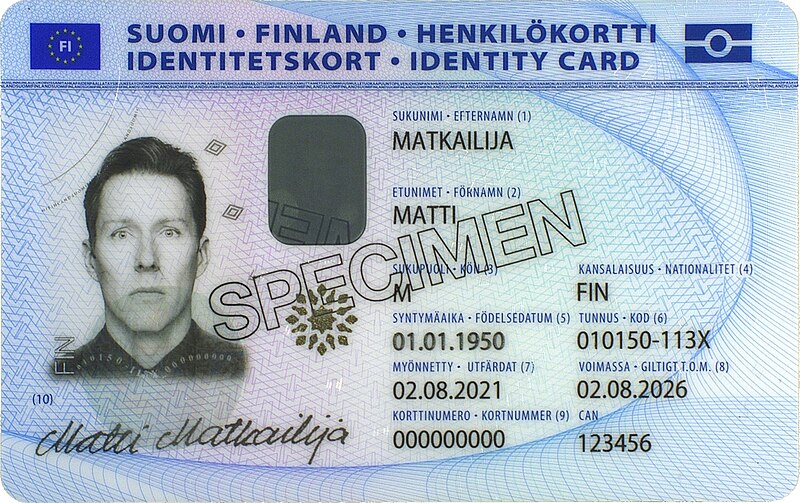
Credit: en.wikipedia.org
Are you waiting to receive your NID Smart Card and want to check its status? Look no further, as we have compiled a step-by-step guide to help you check the status of your NID Smart Card. Whether you prefer online verification, SMS verification, or phone verification, we've got you covered. Read on to learn more!
To check the status of your NID Smart Card online, follow these simple steps:
By following these quick and easy steps, you can conveniently check the status of your NID Smart Card online from the comfort of your own home.
If you prefer to check the status of your NID Smart Card via SMS, here's what you need to do:
With just a few taps on your phone, you can easily receive the status of your NID Smart Card via SMS.
To check the status of your NID Smart Card using your phone, follow these steps:
With a simple phone call, you can quickly obtain the status of your NID Smart Card without any hassle.
When it comes to checking the status of your NID smart card, encountering common issues and the need for troubleshooting is not uncommon. Whether you are facing invalid input errors or network connectivity problems, it's essential to understand these issues and know how to troubleshoot them effectively.
If you are experiencing invalid input errors while trying to check your NID smart card status, first ensure that you have entered the correct information. Double-check the National Identity Card Number or Form Number to ensure there are no typos. Be mindful of any spaces or special characters that may be causing the input errors. If the issue persists, consider using a different web browser or device to rule out any technical glitches.
Network connectivity problems can hinder your ability to check the status of your NID smart card. Start by verifying your internet connection and try accessing the NID service website from another location or using a different network. If the problem persists, consider reaching out to your internet service provider to address any underlying connectivity issues. Additionally, clearing your browser's cache and cookies can often resolve temporary network-related issues.

Credit: www.amazon.com
You can check the status of your NID Smart Card online by visiting the official website services. nidw. gov. bd. Click on the "Smart Card Status check" and enter the required information to track the status of your card.
To check the status of your Smart NID Card, you will need either the National Identity Card Number or the Form Number provided during the application process.
After checking your Smart NID Card status online, the physical card delivery time may vary. However, once the status shows "issued," you can expect to receive the card within the designated delivery period.
To check the status of your Nid Smart Card online, visit services. nidw. gov. bd and click on the apply button for new enrollment. It's a quick and easy process that allows you to stay updated on when you can expect to receive your physical smart card.
By following these steps, you can ensure a smooth experience and avoid any delays in receiving your Smart Nid Card. Stay informed and stay connected with the Nid Smart Card Status Check.




৫৩
৯২ মন্তব্য