
মো. রাকিবুল ইসলাম
সহকারী শিক্ষক
২২ আগস্ট, ২০২৬ ১২:০৮ পূর্বাহ্ণ
সহকারী শিক্ষক
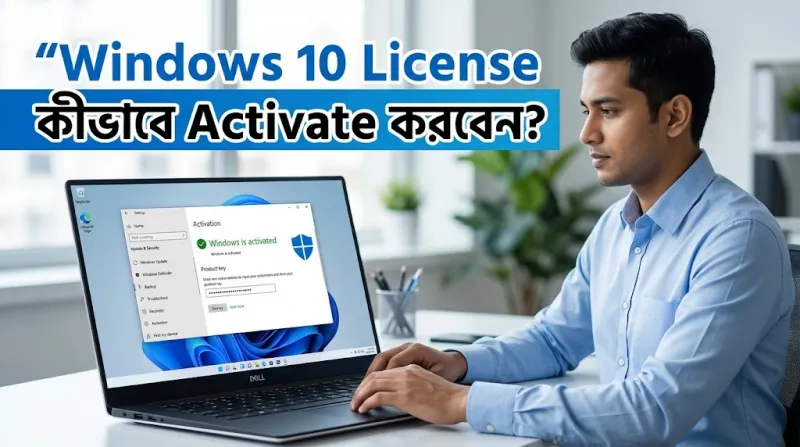
Windows 10 ব্যবহার করছেন কিন্তু “Activate Windows” লেখা দেখাচ্ছে? তাহলে আপনার কম্পিউটারে Windows-এর বৈধ Product Key অথবা Digital License প্রয়োজন হতে পারে। Microsoft-এর তথ্য অনুযায়ী, Windows 10 সাধারণত ২৫ অক্ষরের Product Key অথবা Digital License দিয়ে Activate করা যায়।
এই গাইডে জানবেন Windows 10-এর Activation Status কীভাবে Check করবেন, Product Key দিয়ে কীভাবে Activate করবেন এবং Activation না হলে কী করবেন।
Windows License হলো Windows ব্যবহারের বৈধ অনুমতি। এটি দুইভাবে থাকতে পারে—Product Key অথবা Digital License।
Product Key সাধারণত ২৫ অক্ষরের হয়:
XXXXX-XXXXX-XXXXX-XXXXX-XXXXX
আর Digital License থাকলে আলাদা করে Product Key টাইপ করার প্রয়োজন হয় না।
প্রথমে আপনার Windows-এর Activation Status দেখে নিন।
Windows 10-এ:
Start → Settings → Update & Security → Activation
এখানে Windows Activated কি না দেখতে পারবেন। Microsoft-এর Activation Page-এই আপনার License Status দেখানো হয়।
যদি “Windows is activated” লেখা থাকে, তাহলে আপনার Windows ইতিমধ্যে Activated।
আপনার কাছে বৈধ Windows 10 Product Key থাকলে নিচের ধাপগুলো অনুসরণ করুন।
Start Menu থেকে Settings খুলুন।
এরপর:
Update & Security → Activation
এ যান।
Activation Page-এ Change product key অপশনে ক্লিক করুন।
আপনার ২৫ অক্ষরের বৈধ Product Key লিখুন।
উদাহরণ:
XXXXX-XXXXX-XXXXX-XXXXX-XXXXX
এরপর Next চাপুন।
Internet Connection থাকলে Windows Key যাচাই করে Activation সম্পন্ন করার চেষ্টা করবে।
আপনার PC-এর সঙ্গে যদি আগে থেকেই Digital License যুক্ত থাকে, তাহলে Product Key Enter করার প্রয়োজন নাও হতে পারে।
Internet-এ Connect করুন এবং যে Microsoft Account-এর সঙ্গে Digital License যুক্ত আছে, সেটিতে Sign In করুন। Microsoft-এর মতে, Digital License আপনার Device-এর সঙ্গে যুক্ত থাকে এবং Microsoft Account-এর সঙ্গে Link করা থাকলে ভবিষ্যতে Reactivation সহজ হতে পারে।
না। Windows 10-এর Home এবং Pro আলাদা Edition।
আপনার PC-তে Windows 10 Home Installed থাকলে Windows 10 Pro-এর License ব্যবহার করার আগে Edition Upgrade করার প্রয়োজন হতে পারে। Microsoft-এর নির্দেশনাতেও Home Digital License এবং Pro Edition-এর ক্ষেত্রে Edition মিলিয়ে নেওয়ার কথা বলা হয়েছে।
তাই License কেনার আগে আপনার Windows Edition Check করুন:
Settings → System → About
তারপর Windows specifications-এর নিচে Edition দেখুন।
বৈধ License থাকার পরও Activation না হলে কয়েকটি বিষয় Check করুন।
Windows Activation-এর সময় Internet Connection প্রয়োজন হতে পারে। তাই Wi-Fi বা Mobile Data ঠিকমতো কাজ করছে কি না দেখুন।
Key টাইপ করার সময় একটি অক্ষর ভুল হলেও Activation ব্যর্থ হতে পারে। Product Key আবার ভালোভাবে মিলিয়ে Enter করুন।
আপনার Product Key এবং Installed Windows Edition একই কি না Check করুন।
উদাহরণ:
Windows 10 Home → Windows 10 Home License
Windows 10 Pro → Windows 10 Pro License
Windows-এর Activation সমস্যা হলে Microsoft-এর Activation Troubleshooter ব্যবহার করতে পারেন। Digital License থাকলেও Windows Activate না হলে Troubleshooter থেকে Activation-এর সমস্যা সমাধানের চেষ্টা করা যায়।
Motherboard-এর মতো বড় Hardware Change করলে Windows-এর Digital License আর Device-এর সঙ্গে Match নাও করতে পারে।
যদি Digital License Microsoft Account-এর সঙ্গে আগে থেকেই Link করা থাকে, তাহলে Activation Troubleshooter ব্যবহার করে Windows Reactivate করার চেষ্টা করা যায়।
যদি আপনার একই PC-তে আগে থেকেই Windows 10-এর বৈধ Digital License থাকে এবং একই Edition আবার Install করেন, তাহলে সাধারণত নতুন Product Key দেওয়ার প্রয়োজন হয় না। Installation-এর সময় Product Key চাইলে “I don't have a product key” নির্বাচন করা যায় এবং Installation শেষে Internet-এর মাধ্যমে Windows Automatically Activate হতে পারে।
Windows 10 Installation Media প্রয়োজন হলে Microsoft-এর Official Windows 10 Download Page ব্যবহার করুন। Microsoft সেখানে Media Creation Tool দিয়ে Windows 10 Download ও Installation Media তৈরির নির্দেশনা দিয়েছে।
Microsoft-এর Official Windows 10 Download Page
তবে একটি গুরুত্বপূর্ণ বিষয় হলো, Windows 10-এর Free Support এবং Security Updates 14 October 2025-এ শেষ হয়েছে। Microsoft এখন Windows 11-এ Upgrade করার পরামর্শ দিচ্ছে।
Windows License কেনার সময় শুধু কম দাম দেখলেই হবে না। License Type, Windows Edition, Activation Method এবং Seller Support সম্পর্কে আগে পরিষ্কার হওয়া ভালো।
বাংলাদেশ থেকে Windows 10 Pro License নিতে চাইলে Tech Haat-এর Windows 10 Pro Bangladesh দেখতে পারেন।
যাদের Windows 10 Home License প্রয়োজন, তারা Windows 10 Home Price in Bangladesh সম্পর্কে জানতে পারেন।
আর Windows, Office এবং অন্যান্য Software License একসঙ্গে দেখতে Tech Haat Software Category দেখতে পারেন।
License কেনার আগে কয়েকটি বিষয় দেখে নিন:
এগুলো আগে নিশ্চিত করলে ভুল License কেনার সম্ভাবনা অনেক কমে।
Windows Activate করার জন্য Crack, KMS Activator বা অজানা Activation Tool ব্যবহার না করাই ভালো। এগুলো Security Risk তৈরি করতে পারে এবং Windows-এর বৈধ License-এর বিকল্প নয়।
একটি বৈধ Product Key বা Digital License ব্যবহার করাই নিরাপদ পদ্ধতি।
Windows 10 Activate করার সবচেয়ে সহজ ও নিরাপদ উপায় হলো বৈধ Product Key অথবা Digital License ব্যবহার করা। প্রথমে আপনার Activation Status এবং Windows Edition Check করুন। এরপর সঠিক License থাকলে Settings → Update & Security → Activation → Change product key থেকে Product Key দিয়ে Activation করতে পারেন।
বাংলাদেশে Windows 10 Pro License নিতে চাইলে Tech Haat-এর Windows 10 Pro License দেখতে পারেন। আর Home Edition-এর জন্য Windows 10 Home License দেখতে পারেন।





১৩
১৮ মন্তব্য