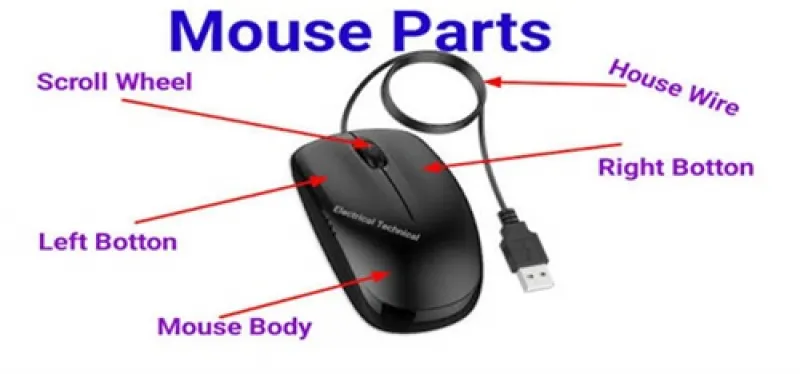
Here are some detailed diagrams and pictures breaking down the main parts of a computer mouse:
Key External Parts
- Left Button: Used to select items, click links, and open files.
- Right Button: Opens context menus and specific option lists.
- Scroll Wheel: Rolls up and down to quickly move through pages.
- Mouse Body / Shell: The outer casing where you rest your palm.
- Side Buttons: Found on gaming or advanced mice for extra programming functions.
Key Internal & Bottom Parts
- Optical Sensor: The LED light or laser on the bottom that tracks movement.
- Glide Pads / Feet: Low-friction pads that help the mouse slide smoothly.
- Circuit Board (PCB): The internal brain processing your clicks and movements.